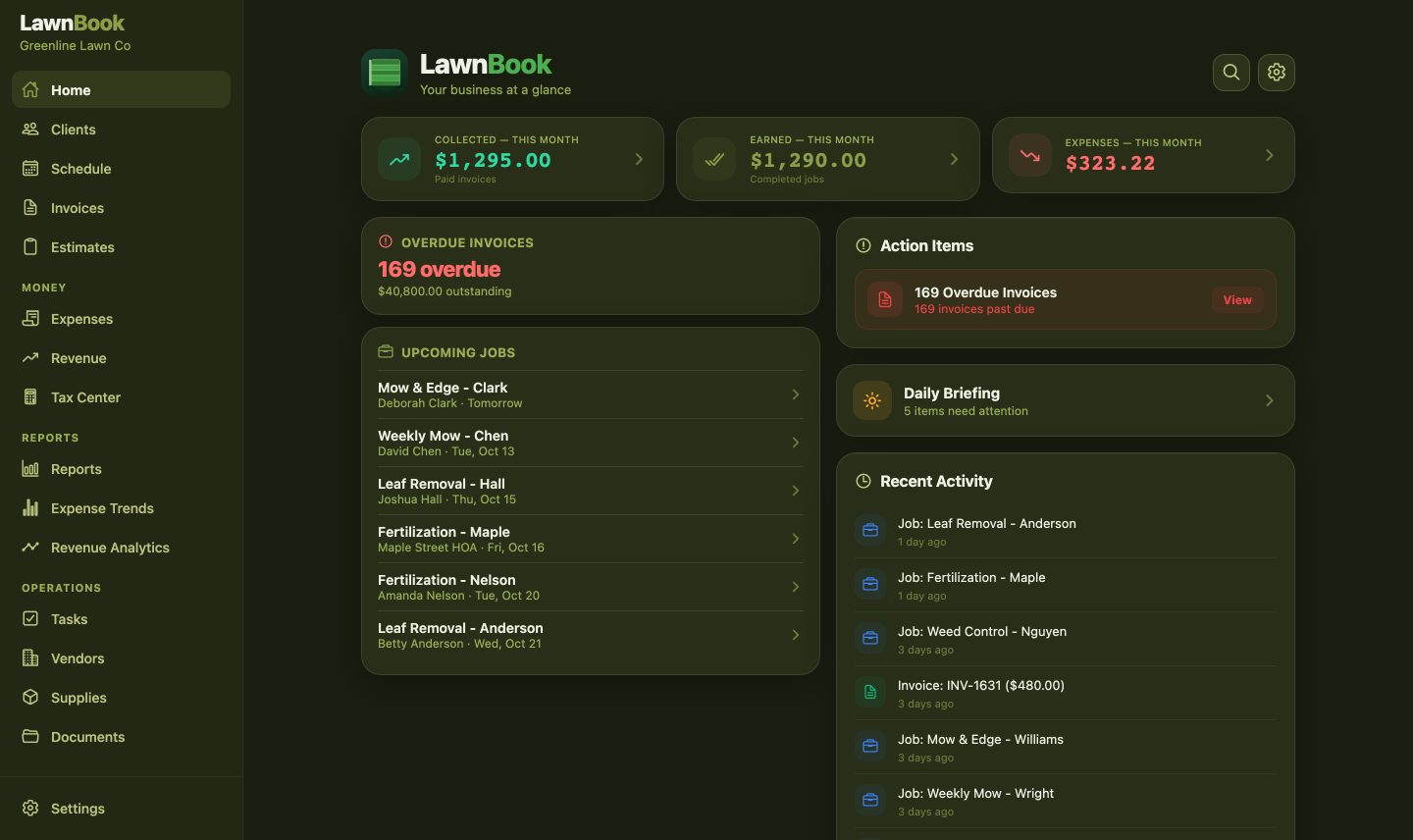
What you get on the web
LawnBook on the web puts your business on a computer screen: the week's schedule, client and invoice lists you can sort and search, your money numbers and the tax center. It shows the same business you run in the app, so there's nothing to set up twice.
Before you start
- A paid plan. LawnBook on the web is included with Pro, Premium and Crew plans. Free accounts can upgrade in the app.
- Sign in with Apple or Google in the app. The web reads the copy of your business that LawnBook keeps in sync for signed-in accounts. If you only use LawnBook without signing in (iCloud backup only), sign in first in the app under Settings → Account.
- The business owner turns it on. Web access is off until the owner switches it on in the app.
- LawnBook 1.3.0 or later on your phone or tablet, which has the switch.
Turn it on in the app
Sign in on your computer
There's no separate web account and no password to remember. To sign out, use Sign out in the banner at the top of every page or in Settings.
What's on the web
On a wide screen LawnBook shows a sidebar with:
| Section | What you'll find |
|---|---|
| Home | Your dashboard: revenue, upcoming jobs and action items |
| Clients | Every client and property, with search and sorting |
| Schedule | The whole week of jobs at a glance |
| Invoices & Estimates | Status, amounts and due dates across all clients |
| Money | Expenses, revenue and the tax center |
| Reports | Reports, expense trends and revenue analytics |
| Operations | Tasks, vendors, supplies and documents |
In a narrow browser window the sidebar becomes the same tab bar you know from the app.
Still in the app only
- Adding or editing anything (the web is view-only for now)
- Photos, receipts and your logo, which stay on your phone
- Creating PDFs, receipts and payment links
- AI tools, receipt scanning, voice entry and route navigation
- Time clock, caller ID and crew invites
- Buying or changing a plan, and deleting your account
How the web stays up to date
Changes you make in the app sync to LawnBook's servers when your phone is online. The web checks for new changes every two minutes, whenever you come back to the tab, and when your connection returns. If something you just entered on your phone hasn't appeared, open the app for a moment so it can sync, then give the web a minute.
Crew members
Crew members can sign in on the web too, with the Apple or Google account they joined your crew with. They need the owner's plan and switch to be on. On the web, workers don't see money screens, vendors, supplies or documents.
Security and shared computers
- A web session lasts 12 hours and renews while LawnBook is open. After that you sign in again.
- Your plan and access are checked on every request, so a cancelled plan or a switched-off web setting takes effect right away.
- Signing out deletes the copy of your business stored in that browser, which makes it safe to use on a shared computer.
- If a different person signs in on the same browser, the previous person's data is erased first.
- To cut off every computer at once, the owner switches LawnBook on the web off in the app.
If sign-in doesn't work
| You see | What to do |
|---|---|
| No LawnBook account found | Install LawnBook on your phone, sign in there with this Apple or Google account, then come back. |
| Use your original sign-in | Your account was first set up with the other provider. Sign in with that one (for example, Sign in with Apple). |
| Web is included with Pro, Premium and Crew | Upgrade in the LawnBook app, then sign in again. |
| Turn on LawnBook on the web | The owner opens Settings → LawnBook on the web in the app and switches it on. |
| Your session ended | Sign in again. Sessions last 12 hours. |
| Couldn't load your business | Check your internet connection and reload the page. |
Something else? See Sync & sign-in help or contact support.